Platform:Windows2000,WinXP,Windows2003,Windows Vista Starter,Windows Vista Home Basic,Windows Vista Home Premium,Windows Vista Business,Windows Vista Enterprise,Windows Vista Ultimate,Windows Vista Home Basic
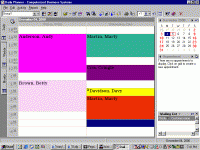
Easy Appointment Scheduling Software. Easy-to-use appointment scheduling software that makes organizing your day, saving time, and increasing productivity as simple ?viewing and clicking?. Try our Free Demo
Easy Appointment Scheduling Software- Web Sync Option Now Available. Easy-to-use appointment scheduling software that makes organizing your day, saving time, and increasing productivity as simple ?view and click?. PLUS version Synchronizes with QuickBooks Pro and above so that you don't have to enter your data twice in two different programs. View schedules side by side. Great for Accountants, Service Businesses, Medical Practices.
New Version 3 optional web sync feature allows you to publish your schedule to the web for employees, providers and or customers. In the previous version of ScheduleVIEW?, you had the ability to rename the terms for Customer, Provider, Resource and Company Name. This allowed you to rename these terms to better suit your particular needs. In the new version of ScheduleVIEW?, the Zip-Code, State, Directions and Insurance field labels are also now customizable. Map Areas
Allow color coding of geographic areas. This sample groups map areas by county, but you can define map areas any way you like to suit your needs. When a map area has been assigned to a customer, the map area color displays in the Schedule Grid on all appointments for that customer. This feature will allow you to see at a glance the general location of each appointment. This can dramatically increase efficiency for businesses that send people out to customer locations. This feature can also be utilized to allow for color coding of customers based on any type of information, not just geographic. For example, a service business can assign different colors to a customer to indicate whether or not that customer has a service contract. With new Map Route Feature you can print a report that shows the route from the office to the first appointment and then from the first appointment to the second appointment and so on for all of the appointments for the day. You can now import Customer Jobs from QuickBooks and MS Outlook Sync has been improved also. Whats new in version 3.0.76: Web Sync; Google Maps; QuickBooks Jobs Sync; Insurances Requirements: 256MB RAM for Windows 2000, Windows XP, 1-2GB ram for Vista or Windows 2003 Operating system: Windows2000,WinXP,Windows2003,Windows Vista Starter,Windows Vista Home Basic,Windows Vista Home Premium,Windows Vista Business,Windows Vista Enterprise,Windows Vista Ultimate,Windows Vista Home Basic Release notes: Major Update
While your computer is idle, five full size pictures appearing on your screen will give you the opportunity to take a look at these beautiful girls' abstract photos. Don't miss the chance to make your fantasies come true.
Price: $7.50, Rating: 10, Downloads: 236 Download
Do you like Christmas? Too bad it comes only once a year. Hey, if you really, really like Christmas - why not have it every day? Christmas 3D Screensaver brings the warm feelings of joy right to your computer desktop.
Price: $12.95, Rating: 10, Downloads: 200 Download
Love-tenderness of Sathya Sai Baba -- in His face, in the beauty of nature, in every manifestation of life. Enjoy, meditate, receive bliss.
Price: $0, Rating: 7.67, Downloads: 186 Download
Enjoy the variety of dog species. While your computer is idle, five full size pictures appearing on your screen will show you how sweet they are especially when they are still puppies. Don't miss the chance to experience that.
Price: $7.50, Rating: 5, Downloads: 170 Download
A map of recently discovered lands lies on the table with a magnifying glass nearby. Most likely, the owner of the room is planning his new trip to the newly discovered lands to describe the people who live there.
Price: $12.95, Rating: 5, Downloads: 165 Download
User Rating
Rating:2.2 out of
5 Based on13 ratings.
13 user reviews.

 Scheduleview 3.0.76 details